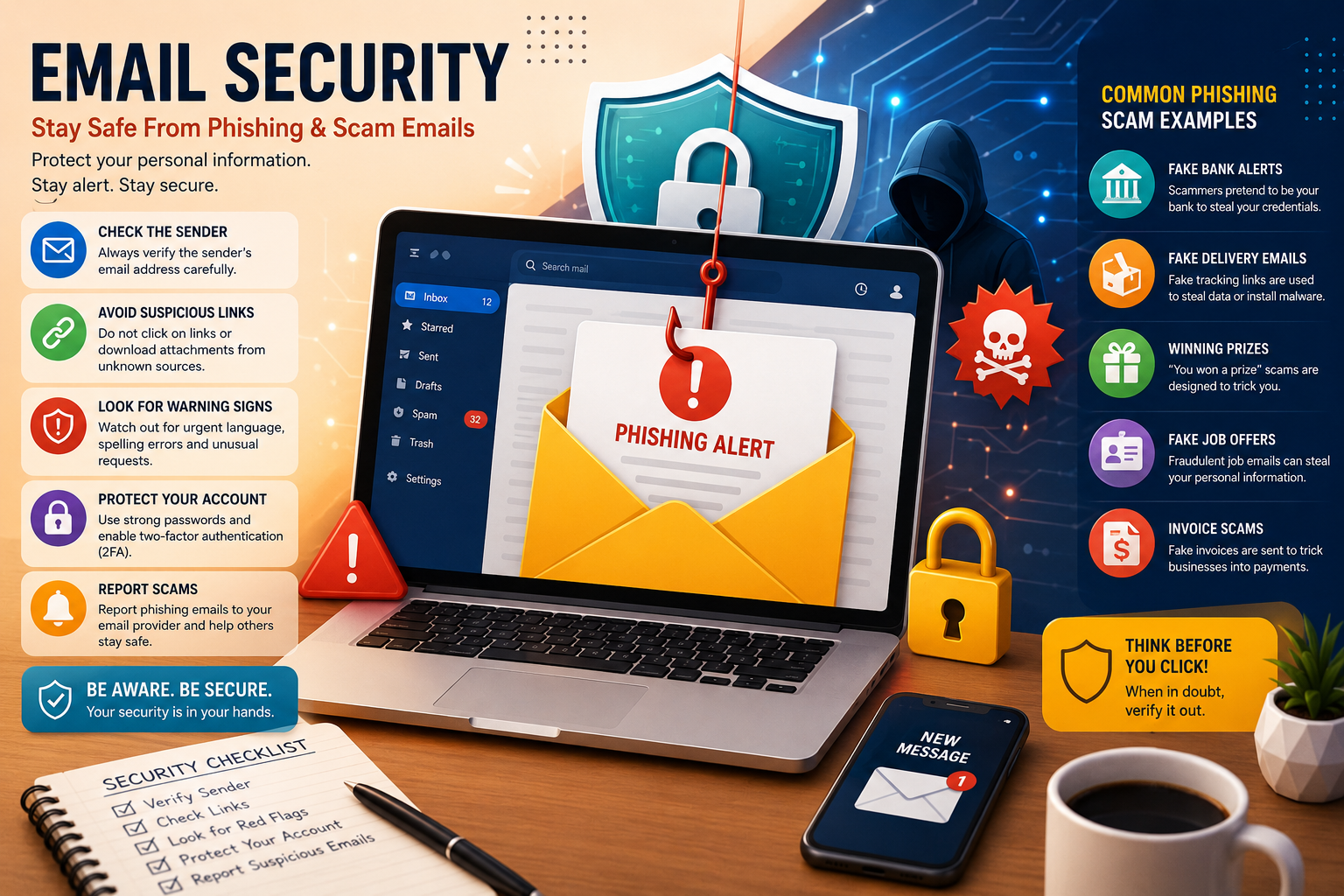
Email Security Tips: Phishing Aur Scam Emails Se Bachne Ka Tarika (Complete Beginner Guide 2026)
Introduction
Email has become one of the most important communication tools in the modern world. People use email for business communication, online shopping, banking, social media accounts, government services, education, and countless other activities.
Unfortunately, cybercriminals also use email as a weapon.
Every day, millions of phishing and scam emails are sent worldwide. Their purpose is simple: steal personal information, passwords, banking details, or money from unsuspecting victims.
Small mistakes such as clicking a malicious link, downloading an infected attachment, or sharing login credentials can lead to serious consequences including identity theft, financial loss, hacked accounts, and data breaches.
The good news is that most phishing attacks can be prevented through awareness and proper security practices.
This guide explains everything you need to know about email security, phishing scams, scam emails, and practical methods to protect yourself online.
What Is Email Security?
Email security refers to the practices, technologies, and procedures used to protect email accounts, communications, and sensitive information from cyber threats.
The main objectives of email security include:
- Protecting personal information
- Preventing unauthorized access
- Blocking malware
- Detecting phishing attempts
- Preventing fraud
- Ensuring privacy
Strong email security helps individuals and businesses reduce cybersecurity risks.
Why Email Security Is More Important Than Ever
Cybercrime continues to grow every year.
Modern cybercriminals target:
- Individuals
- Small businesses
- Large corporations
- Government agencies
- Educational institutions
Email remains one of the easiest attack methods because people often trust messages appearing in their inbox.
Common reasons hackers use email include:
- Easy distribution
- Large audience reach
- Low operational cost
- High success rate
A single successful phishing email can compromise entire systems.
Understanding Phishing Emails
Phishing is a cyberattack where criminals pretend to be trustworthy organizations to trick victims into revealing sensitive information.
The attacker may impersonate:
- Banks
- Government agencies
- Social media platforms
- Delivery companies
- Employers
- Online marketplaces
The goal is to convince recipients to perform an action that benefits the attacker.
Examples include:
- Entering passwords
- Sharing banking details
- Downloading malware
- Sending money
How Phishing Emails Work
A typical phishing attack follows these steps:
Step 1: Fake Message Creation
Attackers create emails that resemble legitimate organizations.
They often copy:
- Logos
- Colors
- Branding
- Email templates
The email appears authentic.
Step 2: Emotional Trigger
Attackers create urgency.
Common messages include:
- Account suspension warning
- Security alert
- Unpaid invoice
- Tax refund notification
- Prize winnings
These messages encourage quick action.
Step 3: Malicious Link or Attachment
The email contains:
- Fake login pages
- Malware downloads
- Fraudulent payment requests
Victims unknowingly compromise their information.
Step 4: Data Theft
The attacker captures:
- Usernames
- Passwords
- Credit card details
- Banking information
The stolen data is then used or sold.
Common Types of Phishing Attacks
Understanding phishing variations helps improve protection.
1. Traditional Phishing
Mass emails sent to thousands of recipients.
Example:
“Your bank account has been suspended. Click here to verify your identity.”
Most recipients ignore the email, but some fall victim.
2. Spear Phishing
Highly targeted phishing attacks.
Attackers research victims before sending emails.
These attacks often contain:
- Real names
- Company details
- Personal information
Because they appear personalized, they are more dangerous.
3. Business Email Compromise (BEC)
Attackers impersonate executives or managers.
Employees may receive requests such as:
- Urgent wire transfers
- Invoice payments
- Sensitive documents
BEC scams have caused billions of dollars in losses worldwide.
4. Clone Phishing
Attackers copy a legitimate email and replace links with malicious versions.
Victims believe they are interacting with trusted content.
5. Attachment-Based Phishing
Emails include infected attachments.
Common file types:
- Word documents
- Excel spreadsheets
- ZIP files
Opening these files may install malware.
What Is a Scam Email?
A scam email is any fraudulent email designed to deceive recipients for financial gain or personal information theft.
Not all scam emails are technically phishing attacks.
Some scams simply attempt to manipulate victims emotionally.
Examples include:
- Lottery scams
- Investment scams
- Charity scams
- Romance scams
- Fake inheritance claims
Most Common Scam Emails
Lottery Winner Scam
The victim receives an email claiming they won a prize.
The scammer requests:
- Processing fees
- Personal information
- Banking details
Legitimate lotteries do not operate this way.
Fake Job Offer Scam
Attackers promise high-paying jobs.
They may request:
- Registration fees
- Personal documents
- Banking information
These offers are fraudulent.
Tech Support Scam
Victims are told their devices are infected.
Fake support agents attempt to gain remote access.
This can lead to financial loss and identity theft.
Fake Invoice Scam
Businesses often receive fake invoices.
Employees may unknowingly pay fraudulent bills.
Small businesses are frequent targets.
Warning Signs of Phishing Emails
Recognizing warning signs can prevent attacks.
Suspicious Sender Address
Always inspect the sender’s email address.
Example:
instead of
Small differences often indicate fraud.
Generic Greetings
Many phishing emails use:
- Dear Customer
- Dear User
- Valued Customer
Legitimate businesses often use your name.
Urgent Language
Examples:
- Immediate Action Required
- Account Suspended
- Verify Now
- Final Warning
Urgency is a common manipulation tactic.
Poor Grammar and Spelling
Many scam emails contain:
- Misspellings
- Grammar mistakes
- Unnatural wording
Professional organizations usually maintain higher standards.
Unexpected Attachments
Be cautious when receiving attachments you were not expecting.
Even known contacts can have compromised accounts.
Suspicious Links
Never trust links without verification.
Hover over links before clicking.
Check whether the destination matches the official website.
How Cybercriminals Manipulate Victims
Phishing attacks rely heavily on psychology.
Attackers exploit human emotions.
Common tactics include:
Fear
Examples:
- Account closure warnings
- Security breaches
- Legal threats
Fear encourages impulsive decisions.
Curiosity
Examples:
- Confidential documents
- Secret information
- Unusual account activity
Curiosity often leads to clicks.
Greed
Examples:
- Free money
- Lottery winnings
- Investment opportunities
Offers that seem too good to be true usually are.
Trust
Attackers impersonate trusted organizations.
Victims lower their defenses.
The Cost of Falling for Email Scams
Victims may experience:
- Financial loss
- Identity theft
- Reputation damage
- Data breaches
- Account compromise
- Business disruption
Some victims spend years recovering from identity theft incidents.
Real-World Example of a Phishing Attack
Imagine receiving an email claiming to be from your bank.
The email states:
“Suspicious activity has been detected on your account. Verify your information immediately.”
A button directs you to a login page.
The website looks genuine.
You enter your credentials.
The attacker captures your username and password instantly.
Minutes later, unauthorized transactions begin.
This scenario happens thousands of times every day.
Creating Strong Passwords for Email Security
One of the easiest ways attackers gain access to email accounts is through weak passwords.
Many users still rely on passwords such as:
- 123456
- password
- qwerty
- abc123
- birth dates
- phone numbers
These passwords can often be cracked within seconds.
Characteristics of a Strong Password
A secure password should include:
- Uppercase letters
- Lowercase letters
- Numbers
- Special characters
- At least 12–16 characters
Example:
X8#tL9@pQ4!mN2$
Avoid using personal information that attackers can easily discover through social media.
Use Unique Passwords
Many people use the same password for multiple accounts.
This is extremely dangerous.
If one account is compromised, attackers may gain access to:
- Email accounts
- Banking accounts
- Social media
- Online shopping accounts
Use a different password for every account.
Password Managers
Remembering dozens of complex passwords can be difficult.
Password managers help solve this problem.
Benefits include:
- Secure password storage
- Automatic password generation
- Faster logins
- Reduced password reuse
A password manager can generate highly secure passwords that are difficult to guess.
Enable Two-Factor Authentication (2FA)
Two-factor authentication adds an extra security layer.
Even if a hacker obtains your password, they still need a second verification method.
How 2FA Works
Step 1:
Enter password
Step 2:
Provide a second verification factor
Examples:
- SMS code
- Authentication app code
- Security key
- Email verification
Without the second factor, attackers cannot access the account.
Benefits of Two-Factor Authentication
2FA provides:
- Stronger account protection
- Reduced phishing success
- Better identity verification
- Improved overall security
Security experts strongly recommend enabling 2FA for all email accounts.
Recognizing Fake Login Pages
Modern phishing websites often look nearly identical to legitimate websites.
Cybercriminals copy:
- Logos
- Layouts
- Colors
- Login forms
Many victims cannot immediately recognize the difference.
Verify Website URLs Carefully
Before entering credentials:
Check:
- Domain spelling
- HTTPS encryption
- Website authenticity
Example:
Legitimate:
www.bankname.com
Fake:
www.bankname-security-login.com
Small differences can indicate fraud.
Understanding Email Attachments
Attachments remain a common malware delivery method.
Attackers disguise malicious files as:
- Invoices
- Reports
- Tax documents
- Shipping confirmations
- Job applications
Opening these files may compromise your device.
Dangerous Attachment Types
Exercise caution with:
- .exe files
- .zip files
- Macro-enabled Office documents
- Unknown PDFs
- Script files
Never open attachments from suspicious senders.
Malware Delivered Through Email
Many phishing campaigns distribute malware.
Malware can perform various harmful activities.
Viruses
Viruses infect files and spread throughout systems.
Effects may include:
- Data corruption
- System crashes
- Performance issues
Ransomware
Ransomware encrypts files and demands payment.
Victims may lose access to:
- Personal documents
- Business records
- Databases
- Customer information
Ransomware attacks have affected organizations worldwide.
Spyware
Spyware secretly monitors activity.
It may collect:
- Passwords
- Browsing history
- Financial information
Victims often remain unaware of infection.
Keyloggers
Keyloggers record keyboard activity.
Attackers use this information to steal:
- Login credentials
- Banking details
- Sensitive communications
Safe Email Browsing Habits
Good security habits dramatically reduce risk.
Think Before Clicking
Always pause before clicking links.
Ask yourself:
- Was I expecting this email?
- Does the sender appear legitimate?
- Does the message create urgency?
- Is the request unusual?
A few seconds of verification can prevent major problems.
Verify Requests Independently
If an email claims to be from your bank:
Do not click the provided link.
Instead:
- Open your browser
- Visit the official website manually
- Contact customer support if needed
Independent verification reduces phishing risks.
Avoid Public Wi-Fi Risks
Public Wi-Fi networks can expose users to cyber threats.
When checking email on public networks:
- Use a VPN
- Avoid sensitive transactions
- Log out after use
Secure connections help protect data.
Email Security for Small Businesses
Small businesses are increasingly targeted by cybercriminals.
Many attackers assume small organizations have weaker security.
Why Small Businesses Are Targeted
Common reasons include:
- Limited cybersecurity budgets
- Fewer IT resources
- Lower employee training levels
Attackers view small businesses as easier targets.
Employee Security Training
Employees represent both the greatest defense and the greatest vulnerability.
Training should cover:
- Phishing recognition
- Password security
- Safe browsing
- Attachment handling
- Reporting procedures
Educated employees significantly reduce risk.
Creating Security Policies
Businesses should establish clear email policies.
Examples:
- Never share passwords
- Verify payment requests
- Report suspicious emails
- Use approved communication channels
Security policies create consistency.
Business Email Compromise Prevention
Business Email Compromise (BEC) attacks are highly profitable for criminals.
Attackers impersonate:
- CEOs
- Managers
- Vendors
- Clients
Their goal is usually financial fraud.
Warning Signs of BEC Attacks
Look for:
- Urgent wire transfer requests
- Last-minute payment changes
- Unusual invoice instructions
- Requests for confidential data
Verification should always occur through another communication channel.
Protecting Sensitive Information
Email often contains valuable information.
Examples include:
- Customer records
- Financial data
- Contracts
- Business plans
Protecting this information is essential.
Use Encryption
Encryption converts information into unreadable code.
Only authorized recipients can access encrypted content.
Benefits include:
- Improved privacy
- Reduced interception risks
- Better compliance
Encryption is particularly important for sensitive communications.
Email Privacy Best Practices
Privacy protection is becoming increasingly important.
Users should minimize unnecessary information sharing.
Avoid Oversharing
Never send:
- Passwords
- Banking PINs
- Security answers
- Sensitive personal information
through regular email whenever possible.
Review Email Permissions
Many online services request email access.
Regularly review:
- Connected applications
- Account permissions
- Third-party integrations
Remove anything unnecessary.
Email Security for Mobile Devices
Many people access email primarily through smartphones.
Mobile devices require proper protection.
Enable Device Security
Use:
- PIN codes
- Fingerprint authentication
- Face recognition
- Screen locks
These features help prevent unauthorized access.
Keep Devices Updated
Software updates often contain security patches.
Ignoring updates may leave vulnerabilities unprotected.
Regular updates improve security.
Social Engineering and Email Scams
Phishing attacks often involve social engineering.
Social engineering manipulates human behavior.
Attackers exploit:
- Trust
- Fear
- Curiosity
- Authority
- Urgency
Understanding these tactics improves defense.
Common Social Engineering Techniques
Authority Impersonation
Attackers pretend to be:
- Executives
- Government officials
- Law enforcement
- Technical support agents
People tend to obey authority figures.
Scarcity Tactics
Examples:
- Limited-time offers
- Account expiration warnings
- Urgent deadlines
Scarcity encourages impulsive decisions.
Emotional Manipulation
Attackers often trigger emotions.
Examples include:
- Fear
- Excitement
- Sympathy
- Panic
Emotional responses reduce rational thinking.
What to Do If You Click a Phishing Link
Mistakes happen.
Quick action can reduce damage.
Step 1: Disconnect if Necessary
If malware may have downloaded:
Disconnect from the internet.
This may limit communication with attackers.
Step 2: Change Passwords Immediately
Update passwords for:
- Email accounts
- Banking services
- Social media
- Shopping platforms
Use strong unique passwords.
Step 3: Enable Two-Factor Authentication
Activate 2FA if not already enabled.
This helps secure accounts after compromise.
Step 4: Run Security Scans
Use reputable security software to scan devices.
Remove any detected threats.
Step 5: Notify Relevant Organizations
If banking information was exposed:
Contact:
- Banks
- Credit card providers
- Financial institutions
Prompt reporting can reduce losses.
Security Tools That Improve Email Protection
Several tools help strengthen defenses.
Spam Filters
Spam filters identify suspicious emails before they reach inboxes.
Benefits include:
- Reduced phishing exposure
- Better inbox organization
- Automated threat detection
Antivirus Software
Antivirus programs help detect:
- Malware
- Ransomware
- Trojans
- Spyware
Regular updates are essential.
Browser Security Features
Modern browsers often include:
- Safe browsing alerts
- Malicious site warnings
- Download protection
Keep browsers updated.
Cybersecurity Trends Affecting Email Users
Email threats continue evolving.
Future risks include:
- AI-generated phishing emails
- Deepfake scams
- Automated fraud campaigns
- Highly personalized attacks
Cybercriminals increasingly use advanced technologies.
Users must remain vigilant.
Creating a Personal Email Security Checklist
A simple checklist can improve security dramatically.
Before interacting with an email, verify:
✓ Sender address
✓ Link destination
✓ Attachment legitimacy
✓ Grammar quality
✓ Request authenticity
✓ Urgency indicators
✓ Website domain accuracy
Following this checklist consistently reduces risk.
Building a Security-First Mindset
Technology alone cannot eliminate cyber threats.
The strongest defense remains awareness.
Always remember:
- Verify before trusting
- Think before clicking
- Question unusual requests
- Protect personal information
- Stay informed about new threats
Security awareness is an ongoing process.
Advanced Email Security Strategies
As cybercriminals become more sophisticated, basic email security practices alone may not be enough. Individuals and businesses should adopt advanced security measures to strengthen their defenses against evolving threats.
Advanced email security combines technology, user awareness, authentication protocols, and continuous monitoring.
The goal is simple:
Prevent attacks before they cause damage.
Understanding Email Authentication
One major challenge with email communication is verifying whether a message actually comes from the claimed sender.
Cybercriminals frequently spoof email addresses.
Spoofing occurs when attackers forge sender information to appear legitimate.
Email authentication technologies help solve this problem.
What Is SPF?
SPF stands for Sender Policy Framework.
SPF allows domain owners to specify which mail servers are authorized to send emails on behalf of their domain.
When a receiving email server gets a message, it checks whether the sending server is approved.
Benefits include:
- Reduced spoofing
- Improved trust
- Better email deliverability
- Stronger brand protection
SPF is one of the first lines of defense against email fraud.
What Is DKIM?
DKIM stands for DomainKeys Identified Mail.
DKIM adds a digital signature to outgoing emails.
This signature verifies:
- Email authenticity
- Message integrity
If attackers modify the email during transmission, the signature becomes invalid.
Benefits include:
- Prevents tampering
- Confirms authenticity
- Increases trustworthiness
Many large organizations rely heavily on DKIM.
What Is DMARC?
DMARC stands for Domain-based Message Authentication, Reporting and Conformance.
DMARC works together with SPF and DKIM.
It allows domain owners to:
- Define authentication policies
- Receive security reports
- Reduce domain abuse
DMARC helps organizations detect phishing attempts that misuse their brand.
Why Businesses Need SPF, DKIM, and DMARC
Without email authentication:
Attackers can impersonate:
- Companies
- Employees
- Brands
- Support teams
This can lead to:
- Financial fraud
- Reputation damage
- Customer distrust
Authentication protocols help prevent these problems.
How Cybercriminals Use Artificial Intelligence
Artificial Intelligence is transforming both cybersecurity and cybercrime.
Unfortunately, attackers now use AI to create highly convincing phishing emails.
AI-Powered Phishing
Traditional phishing emails often contained:
- Poor grammar
- Spelling mistakes
- Unnatural language
AI-generated emails can appear professional and convincing.
Attackers can create:
- Personalized messages
- Business communications
- Customer support emails
- Fake notifications
with remarkable accuracy.
Deepfake Scams
Deepfakes use artificial intelligence to mimic voices and videos.
Businesses increasingly face:
- Fake executive calls
- Fraudulent video meetings
- Voice impersonation attacks
These scams often support email-based fraud campaigns.
Real-World Phishing Case Studies
Learning from actual attacks improves awareness.
Case Study 1: Fake Bank Security Alert
A user receives:
“Your account has been locked due to suspicious activity.”
The email includes a login link.
The website appears identical to the bank’s official website.
The victim enters:
- Username
- Password
- Security code
The attacker immediately gains account access.
Lessons Learned
- Verify URLs carefully
- Visit official websites directly
- Never trust urgent requests blindly
Case Study 2: Business Email Compromise
An accounting employee receives an email from what appears to be the CEO.
The email requests:
“Please process an urgent payment today.”
Because the request appears legitimate, the employee transfers funds.
The company later discovers the CEO never sent the email.
Losses exceed thousands of dollars.
Lessons Learned
- Verify financial requests
- Use secondary approval processes
- Train employees regularly
Case Study 3: Fake Delivery Notification
A recipient receives a package delivery email.
The message contains:
“Your package is waiting. Download the delivery document.”
The attachment installs malware.
The malware steals passwords stored on the computer.
Lessons Learned
- Be cautious with attachments
- Verify package tracking through official websites
- Keep security software updated
Email Security for Remote Workers
Remote work has increased significantly.
Unfortunately, cybercriminals target remote employees because they often work outside traditional office security environments.
Secure Home Networks
Remote workers should:
- Change default router passwords
- Enable WPA3 or WPA2 encryption
- Update router firmware
- Disable unnecessary services
A secure home network reduces risks.
Use VPN Services
A Virtual Private Network encrypts internet traffic.
Benefits include:
- Improved privacy
- Protection on public Wi-Fi
- Reduced interception risks
VPNs are particularly useful for remote workers.
Recognizing Social Engineering Beyond Email
Many phishing attacks combine multiple communication methods.
Attackers may use:
- SMS
- Phone calls
- Social media
These methods often support each other.
Smishing
Smishing refers to phishing through text messages.
Examples include:
- Fake package alerts
- Banking notifications
- Prize announcements
The goal remains the same: steal information.
Vishing
Vishing refers to voice phishing.
Attackers call victims pretending to be:
- Banks
- Government agencies
- Technical support
Victims may reveal sensitive information over the phone.
Protecting Children and Families
Cybersecurity is important for families as well.
Children often lack experience identifying scams.
Parents should teach:
- Safe internet habits
- Scam recognition
- Password security
- Privacy protection
Education remains one of the strongest defenses.
Email Security Best Practices for Students
Students are frequently targeted through:
- Scholarship scams
- Fake educational offers
- Student loan fraud
- Free software scams
Students should:
- Verify educational communications
- Use school-approved resources
- Enable two-factor authentication
Creating an Incident Response Plan
Even strong security measures cannot guarantee complete protection.
Organizations should prepare for security incidents before they occur.
Components of an Incident Response Plan
Detection
Identify suspicious activity quickly.
Examples include:
- Unauthorized logins
- Unusual emails
- Account lockouts
Containment
Limit the damage.
Actions may include:
- Disconnecting affected devices
- Disabling compromised accounts
Investigation
Determine:
- What happened
- How attackers gained access
- Which systems were affected
Recovery
Restore operations safely.
Examples:
- Password resets
- System restoration
- Security updates
Review
Analyze lessons learned.
Improve future defenses.
Security Awareness Training
Technology alone cannot stop phishing.
Human awareness remains essential.
Organizations should conduct:
- Regular training sessions
- Simulated phishing tests
- Security workshops
- Awareness campaigns
Educated users are less likely to become victims.
Building a Cybersecurity Culture
Cybersecurity should become part of daily habits.
Employees should feel comfortable:
- Reporting suspicious emails
- Asking questions
- Verifying unusual requests
A security-focused culture strengthens organizational resilience.
Common Myths About Email Security
Many misconceptions create unnecessary risks.
Myth 1: “I Am Not Important Enough to Be Targeted”
Reality:
Attackers target millions of ordinary users every day.
Anyone can become a victim.
Myth 2: “My Antivirus Protects Me from Everything”
Reality:
Security software helps but cannot prevent every attack.
User awareness remains critical.
Myth 3: “Phishing Emails Are Easy to Spot”
Reality:
Modern phishing campaigns can appear extremely convincing.
Even experienced professionals sometimes fall victim.
Myth 4: “I Use Strong Passwords, So I Am Safe”
Reality:
Strong passwords are important but should be combined with:
- Two-factor authentication
- Security awareness
- Safe browsing practices
Future Trends in Email Security
Cybersecurity continues evolving.
Future developments may include:
AI-Based Threat Detection
Security systems increasingly use artificial intelligence to:
- Detect suspicious behavior
- Identify phishing attempts
- Analyze threats automatically
Behavioral Analytics
Future systems may analyze:
- Login habits
- Device usage
- Communication patterns
to identify abnormal activity.
Zero Trust Security Models
The Zero Trust approach assumes no user or device should be automatically trusted.
Verification occurs continuously.
This model is becoming increasingly popular among organizations.
Complete Email Security Checklist
Use this checklist before interacting with any email.
Verify Sender
✓ Check email address carefully
✓ Confirm domain authenticity
Inspect Links
✓ Hover before clicking
✓ Verify destination websites
Review Content
✓ Check grammar and spelling
✓ Look for urgency tactics
✓ Identify unusual requests
Examine Attachments
✓ Confirm legitimacy
✓ Avoid unexpected downloads
Protect Accounts
✓ Use strong passwords
✓ Enable 2FA
✓ Update credentials regularly
Maintain Devices
✓ Install updates
✓ Use antivirus software
✓ Run security scans
Key Takeaways
Email remains one of the most valuable communication tools in modern life, but it is also one of the most frequently exploited attack channels.
Protecting yourself requires a combination of:
- Awareness
- Strong passwords
- Multi-factor authentication
- Safe browsing habits
- Regular updates
- Continuous learning
Cybercriminals constantly adapt their tactics, making ongoing vigilance essential.
Conclusion
Phishing and scam emails continue to be among the most common cyber threats facing internet users today. Understanding how these attacks operate is the first step toward protecting yourself, your family, and your business.
By learning to identify suspicious messages, verify sender identities, avoid risky links, and understand attacker tactics, you can dramatically reduce your chances of becoming a victim.
In Part 2, we will explore advanced email security techniques, password protection, multi-factor authentication, secure email practices, malware prevention, business email protection, and practical cybersecurity strategies for long-term online safety.
Email security is not a one-time task but a continuous responsibility. By using strong passwords, enabling two-factor authentication, recognizing phishing tactics, protecting sensitive information, training employees, and maintaining secure browsing habits, individuals and businesses can significantly reduce their exposure to cyber threats.
Most phishing attacks succeed because victims act quickly without verifying information. Developing a cautious, security-focused mindset is often the most effective defense against scammers and cybercriminals.
In Part 3, we will cover advanced cybersecurity strategies, real-world phishing case studies, email authentication technologies (SPF, DKIM, DMARC), business security frameworks, recovery plans after cyberattacks, and expert-level techniques for long-term protection.
Final Conclusion
Phishing attacks and scam emails are unlikely to disappear anytime soon. As technology evolves, attackers continue developing more sophisticated methods to deceive users and organizations. However, the vast majority of phishing attempts can be prevented through education, awareness, and proper security practices.
By understanding how scammers operate, recognizing warning signs, verifying requests, using authentication tools, and maintaining good cybersecurity habits, individuals and businesses can significantly reduce their exposure to online threats.
Email security is not just about technology—it is about making informed decisions every day. A cautious approach, combined with modern security tools, provides the strongest defense against phishing attacks, scam emails, malware infections, and identity theft.
The more informed you become, the safer your digital life will be.