AI Email Writing Tools Jo Aapka Time Bachayen: Complete Guide for Beginners (2026)
Introduction
Email remains one of the most important communication channels for businesses, freelancers, marketers, students, and professionals worldwide.
Every day, billions of emails are sent and received.
However, writing professional emails can be time-consuming.
People often spend hours:
- Drafting messages
- Editing content
- Checking grammar
- Creating follow-ups
- Personalizing responses
Artificial Intelligence (AI) is changing this process dramatically.
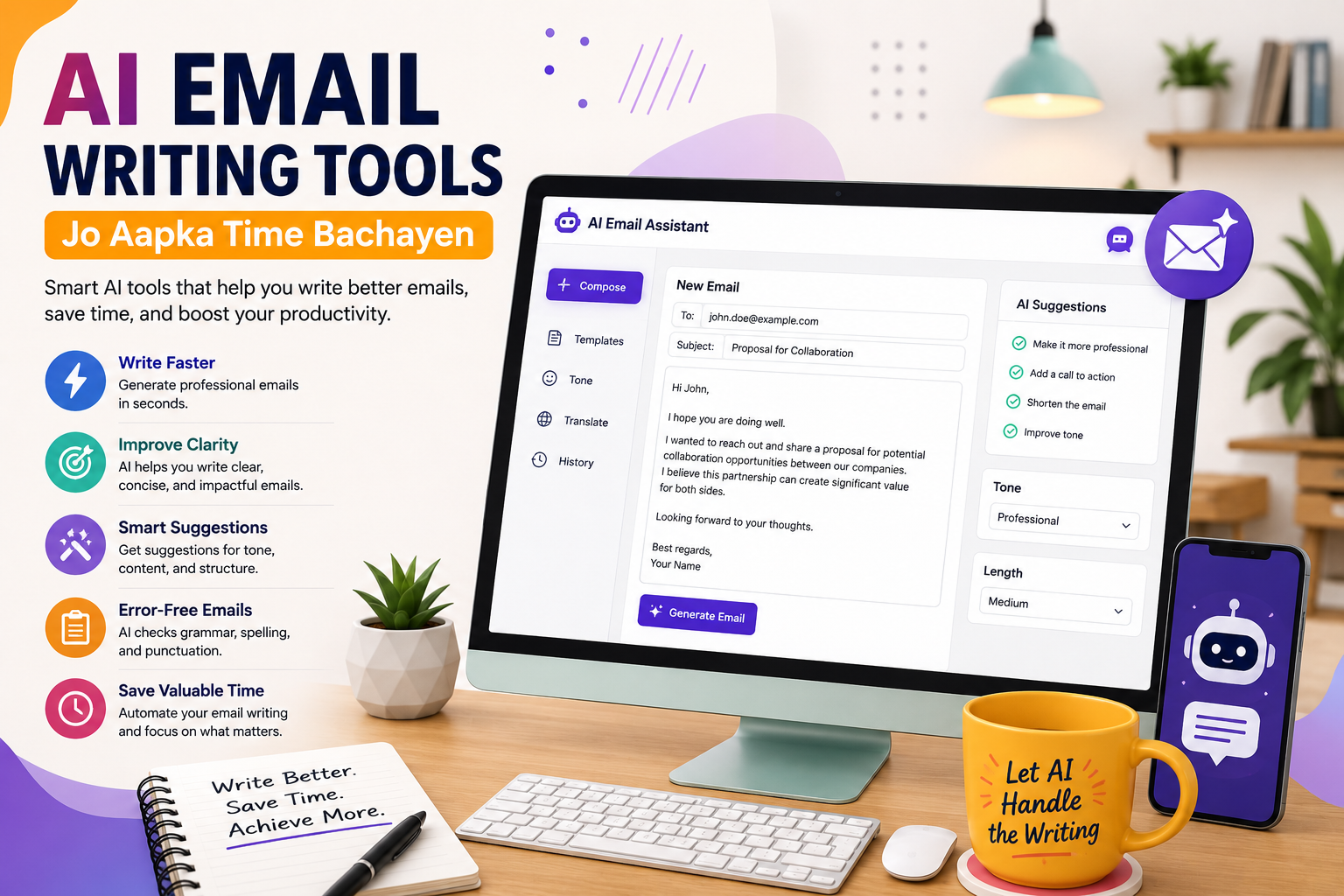
Modern AI email writing tools can help users create professional emails within seconds.
Instead of spending 20 minutes writing an email, AI can generate a polished draft in less than a minute.
This improves productivity and allows professionals to focus on more important tasks.
In this guide, we will explore how AI email writing tools work, their benefits, limitations, and the best tools available today.
What Are AI Email Writing Tools?
AI email writing tools are software applications powered by artificial intelligence and natural language processing (NLP).
These tools help users:
- Write emails
- Improve tone
- Correct grammar
- Generate subject lines
- Create follow-ups
- Personalize messages
- Translate content
AI analyzes user prompts and generates human-like text.
Many modern email assistants integrate directly into email platforms.
How AI Email Writing Tools Work
AI email generators are trained using massive amounts of text data.
The technology learns:
- Grammar patterns
- Writing styles
- Business communication
- Professional language
- Customer interactions
When a user provides instructions, the AI predicts the most appropriate response.
Example prompt:
“Write a professional follow-up email after a sales meeting.”
The AI generates a complete email instantly.
Why AI Email Writing Tools Are Becoming Popular
The popularity of AI email assistants continues growing rapidly.
Several factors contribute to this trend.
Increased Productivity
Professionals often spend hours handling emails.
AI reduces writing time significantly.
This allows employees to focus on strategic work.
Improved Communication
Not everyone is confident in their writing skills.
AI helps create:
- Clear messages
- Professional wording
- Better structure
- Improved readability
Consistency
Businesses require consistent communication.
AI helps maintain:
- Brand voice
- Professional tone
- Messaging standards
across teams.
Reduced Errors
AI tools automatically detect:
- Grammar mistakes
- Spelling errors
- Punctuation issues
This improves email quality.
Key Features of AI Email Writing Tools
Most modern platforms offer several useful features.
Email Generation
The core function is generating complete emails.
Users provide:
- Topic
- Goal
- Context
The AI creates a draft.
Examples:
- Sales emails
- Customer support responses
- Meeting requests
- Follow-ups
Subject Line Generation
Subject lines affect open rates.
AI tools suggest:
- Attention-grabbing headlines
- Personalized subjects
- Optimized wording
This improves engagement.
Tone Adjustment
Different situations require different tones.
AI can create:
- Formal emails
- Friendly emails
- Professional messages
- Persuasive communication
Users simply select the desired style.
Grammar Correction
AI automatically fixes:
- Spelling mistakes
- Grammar issues
- Sentence structure problems
This creates polished content.
Email Summarization
Some tools summarize long email threads.
Benefits include:
- Faster reading
- Better understanding
- Improved productivity
Professionals save valuable time.
Translation Support
Many AI email assistants support multiple languages.
This helps businesses communicate internationally.
Benefits of AI Email Writing Tools
The advantages extend beyond simple convenience.
Save Time
Time savings remain the biggest benefit.
A task requiring 15 minutes may take only 2 minutes with AI assistance.
Over a year, this can save hundreds of hours.
Increase Productivity
Employees spend less time writing.
More time becomes available for:
- Customer service
- Sales activities
- Strategic planning
- Business growth
Improve Professionalism
AI helps create:
- Better structure
- Clear messaging
- Professional wording
This enhances credibility.
Reduce Writer’s Block
Many people struggle to start writing.
AI provides instant drafts.
Users can edit rather than start from scratch.
Better Customer Communication
Customer support teams can respond faster.
This improves:
- Customer satisfaction
- Response times
- Service quality
Who Can Benefit From AI Email Writing Tools?
AI email assistants help many professionals.
Small Business Owners
Business owners handle numerous emails daily.
Examples:
- Customer inquiries
- Vendor communication
- Sales discussions
- Internal coordination
AI reduces workload.
Freelancers
Freelancers frequently send:
- Project proposals
- Client updates
- Invoices
- Follow-ups
AI improves efficiency.
Digital Marketers
Marketing professionals use email extensively.
AI assists with:
- Campaign creation
- Lead nurturing
- Promotional messaging
Sales Teams
Sales representatives benefit from:
- Prospecting emails
- Follow-ups
- Personalized outreach
AI increases outreach capacity.
Customer Support Agents
Support teams often answer repetitive questions.
AI generates accurate responses quickly.
Best AI Email Writing Tools in 2026
Several tools dominate the market.
ChatGPT
ChatGPT is widely used for email drafting.
Strengths:
- Flexible prompts
- High-quality content
- Multiple writing styles
- Fast generation
Users can create professional emails for almost any purpose.
Grammarly AI
Known for writing assistance.
Features include:
- Grammar correction
- Tone suggestions
- Email drafting
- Clarity improvements
Ideal for professionals.
Microsoft Copilot
Integrated with Microsoft products.
Benefits:
- Office integration
- Email assistance
- Productivity enhancements
Popular among enterprise users.
Google Gemini
Google’s AI assistant supports:
- Email creation
- Content drafting
- Productivity workflows
Works well within Google’s ecosystem.
Jasper AI
Focused on business writing.
Useful for:
- Marketing emails
- Sales communication
- Brand messaging
Common Email Types Generated by AI
AI can assist with many email formats.
Examples include:
- Welcome emails
- Follow-up emails
- Cold outreach
- Customer support replies
- Appointment requests
- Sales emails
- Thank-you messages
- Complaint responses
The possibilities are extensive.
How to Write Better Prompts
Results depend heavily on prompt quality.
Poor instructions create weak outputs.
Example of a Weak Prompt
“Write an email.”
The AI lacks context.
Example of a Strong Prompt
“Write a professional follow-up email to a potential client after a website design consultation. Keep the tone friendly and persuasive.”
This produces much better results.
Prompt Writing Formula
Include:
- Purpose
- Audience
- Tone
- Desired outcome
- Length
The more context provided, the better the results.
AI and Email Marketing
AI is transforming email marketing.
Marketers use AI for:
- Campaign creation
- Subject lines
- Segmentation ideas
- Personalization
This improves efficiency and performance.
Advanced AI Email Writing Techniques
Most beginners use AI only for generating simple email drafts.
However, experienced professionals use AI much more strategically.
Advanced AI workflows can help with:
- Personalized outreach
- Customer engagement
- Lead generation
- Email marketing
- Sales communication
- Team collaboration
Understanding these techniques can significantly increase productivity.
Using AI for Personalized Emails
Personalization is one of the most effective email strategies.
Generic emails often receive lower response rates.
AI can create personalized messages based on:
- Customer names
- Business type
- Industry
- Purchase history
- Previous interactions
Personalized emails feel more relevant and engaging.
Example
Instead of:
“Hello Customer,”
AI can generate:
“Hello Sarah,
I noticed your eCommerce business recently expanded into international markets. Congratulations on your growth.”
This approach increases engagement.
AI for Cold Email Outreach
Cold emailing remains a powerful strategy for:
- Freelancers
- Agencies
- Sales teams
- Startups
The challenge is creating personalized outreach at scale.
AI simplifies this process.
Benefits of AI-Powered Cold Emails
AI helps:
- Research prospects
- Generate introductions
- Personalize messages
- Create follow-ups
This allows teams to contact more prospects without sacrificing quality.
AI-Powered Follow-Up Emails
Many opportunities are lost because people fail to follow up.
Research consistently shows that multiple follow-ups often increase response rates.
AI can automatically create:
- Reminder emails
- Meeting follow-ups
- Proposal follow-ups
- Sales follow-ups
This ensures no opportunity is forgotten.
Email Automation with AI
Email automation and artificial intelligence work exceptionally well together.
Automation handles delivery.
AI handles content creation.
Together they create powerful workflows.
Common Automation Workflows
Welcome Sequence
New subscribers automatically receive:
- Welcome emails
- Educational content
- Brand introduction
- Product information
AI can create these emails quickly.
Lead Nurturing
Potential customers receive valuable content over time.
The goal is building trust before a sale.
AI helps generate:
- Educational emails
- Industry insights
- Helpful tips
- Case studies
Customer Retention
Existing customers require ongoing communication.
AI helps create:
- Product updates
- Loyalty campaigns
- Customer success content
- Renewal reminders
AI Prompt Engineering for Email Writing
Prompt engineering refers to creating instructions that generate better AI results.
Better prompts produce better emails.
Components of a Great Prompt
Include:
Audience
Who will read the email?
Examples:
- Customers
- Prospects
- Managers
- Team members
Purpose
What is the goal?
Examples:
- Schedule a meeting
- Sell a product
- Request information
- Follow up
Tone
Specify the desired tone.
Examples:
- Professional
- Friendly
- Formal
- Persuasive
- Casual
Length
Control email size.
Examples:
- Short
- Medium
- Detailed
Example Prompt Template
“Write a professional follow-up email to a marketing client after a consultation call. Keep the tone friendly and confident. Mention website optimization opportunities and invite them to schedule a strategy meeting. Keep it under 200 words.”
This produces high-quality results.
AI for Customer Support Emails
Customer support teams handle repetitive questions every day.
Examples include:
- Order status
- Refund requests
- Account issues
- Product questions
AI helps create responses faster.
Benefits for Support Teams
AI can:
- Reduce response time
- Improve consistency
- Increase customer satisfaction
- Handle large volumes
This improves operational efficiency.
AI for Sales Emails
Sales professionals spend significant time writing emails.
AI accelerates:
- Prospecting
- Lead nurturing
- Objection handling
- Proposal delivery
Sales teams can focus more on closing deals.
Sales Email Examples
AI can create:
- Introduction emails
- Follow-ups
- Meeting requests
- Product demonstrations
- Partnership proposals
in seconds.
AI for Recruitment Emails
Recruiters send numerous emails daily.
Examples include:
- Candidate outreach
- Interview invitations
- Follow-ups
- Offer letters
AI improves recruitment communication.
AI Email Templates
Many tools offer ready-made templates.
Templates save time while maintaining professionalism.
Popular Template Categories
Sales Templates
Used for:
- Lead generation
- Prospect outreach
- Product promotion
Customer Service Templates
Used for:
- Support requests
- Refunds
- Technical assistance
HR Templates
Used for:
- Hiring communication
- Employee updates
- Internal announcements
Marketing Templates
Used for:
- Campaign launches
- Newsletters
- Promotional content
AI Email Summarization
Modern professionals receive dozens or hundreds of emails daily.
Reading every message can be overwhelming.
AI summarization helps users quickly understand:
- Main points
- Action items
- Important updates
This saves valuable time.
Meeting Recap Emails
AI can convert meeting notes into professional recap emails.
Benefits include:
- Better documentation
- Clear action items
- Improved communication
Many businesses use AI for this purpose.
AI Translation for Global Communication
International businesses communicate across multiple languages.
AI-powered translation helps:
- Reduce language barriers
- Improve communication speed
- Support global operations
This is particularly valuable for remote teams.
Productivity Benefits of AI Email Tools
The biggest reason professionals adopt AI is productivity.
Faster Drafting
Emails that previously required:
15–20 minutes
can often be created in:
1–2 minutes.
Better Organization
AI helps manage:
- Priorities
- Responses
- Categorization
This improves workflow efficiency.
Reduced Mental Fatigue
Writing repetitive emails can be exhausting.
AI reduces cognitive workload.
Professionals maintain energy for higher-value tasks.
Limitations of AI Email Writing
Despite impressive capabilities, AI is not perfect.
Understanding limitations is important.
Lack of Human Context
AI does not fully understand every situation.
Human review remains necessary.
Potential Inaccuracies
AI may occasionally generate:
- Incorrect information
- Misleading statements
- Outdated details
Always verify content before sending.
Emotional Intelligence Challenges
Human relationships involve:
- Empathy
- Nuance
- Cultural understanding
AI may struggle with highly sensitive communications.
Over-Reliance Risks
Some users become too dependent on AI.
This can reduce:
- Writing skills
- Critical thinking
- Communication abilities
AI should assist, not replace human judgment.
Privacy and Security Considerations
Privacy is a major concern when using AI tools.
Users should understand how data is processed.
Sensitive Information
Avoid entering:
- Passwords
- Financial records
- Confidential business data
- Personal identification information
into AI systems unnecessarily.
Company Policies
Organizations should establish guidelines for AI usage.
Policies may address:
- Approved tools
- Data handling
- Security procedures
This reduces risk.
Ethical Use of AI
Responsible AI usage is important.
Users should avoid:
- Misleading communication
- Spam campaigns
- Fraudulent activities
Ethical practices build trust.
Future of AI Email Writing
AI technology continues evolving rapidly.
Future capabilities may include:
Hyper-Personalization
Emails tailored to:
- Behavior
- Preferences
- Interests
- Purchase history
in real time.
Predictive Communication
AI may predict:
- Customer needs
- Best send times
- Likely responses
before emails are sent.
Voice-to-Email Creation
Users may simply speak instructions.
AI will generate complete emails instantly.
Smart Email Agents
Future AI assistants may:
- Manage inboxes
- Prioritize communication
- Draft responses automatically
- Schedule meetings
with minimal human intervention.
Best Practices for Using AI Email Tools
To maximize results:
Always Review Content
Check:
- Accuracy
- Tone
- Context
before sending.
Add Human Personalization
Include personal insights.
Human touches improve authenticity.
Use Clear Prompts
Detailed instructions produce better outcomes.
Protect Sensitive Data
Follow security best practices.
Combine AI with Human Judgment
The most successful users blend:
- AI efficiency
- Human expertise
for optimal communication.
Real-World Use Case: Small Business Owner
Imagine a business owner receiving:
- Customer inquiries
- Vendor requests
- Marketing opportunities
- Team communication
daily.
Without AI:
Several hours may be spent writing emails.
With AI:
Drafts are generated instantly.
The owner reviews and sends messages quickly.
This creates significant time savings.
Real-World Use Case: Freelancer
Freelancers frequently send:
- Project proposals
- Client updates
- Follow-ups
- Payment reminders
AI helps maintain professionalism while reducing administrative workload.
Key Takeaways
AI email writing tools offer substantial benefits:
✓ Faster communication
✓ Improved productivity
✓ Better writing quality
✓ Consistent messaging
✓ Reduced workload
✓ Enhanced customer communication
However, users should always review AI-generated content and maintain privacy awareness.
Conclusion
AI email writing tools are revolutionizing how professionals communicate. Whether you are a business owner, freelancer, marketer, student, or employee, AI can significantly reduce the time spent drafting emails while improving quality and professionalism.
These tools are no longer just productivity enhancers; they are becoming essential communication assistants. By learning how to use AI effectively and responsibly, users can save time, increase efficiency, and create stronger relationships through better email communication.
In Part 2, we will cover advanced AI email writing techniques, automation workflows, prompt engineering, real-world use cases, productivity hacks, limitations of AI, privacy concerns, and future trends.